Blog

  • Guardians Quest

    Part 1

    In a kingdom far away, where Cookies came to life, a dream disturbed the sleep of White Coffee Cookie. In the dream, three unique Cookies – one adorned with stars, the other with fire, and the last with a hint of magic, were trying to activate their stars. The dream felt so real that White Coffee Cookie woke up with a start.

    Lying beside her was Vanilla Milk Cookie, her 14-year-old wizard friend, and their younger friends, Moonlight Cookie and Kirby Cookie, both only two years old. The eldest of Vanilla Milk Cookie, Milk Cookie, who was 28 and had the same height as Brioche Cookie, yawned and said, “I had the same dream, about those three Cookies. They seemed important.”

    Their quiet morning contemplation was interrupted by a knock on the door. Vanilla Milk Cookie pened it to find several of their friends – Raspberry Cream Cookie, Choco Souffle Cookie, White Coffee Cookie, Brioche Cookie, Banoffee Cookie, Pimento Cheese Cookie, and Pastry Cookie. Their faces reflected the same mix of confusion and concern. They had all had the same dream.

    Vanilla Milk Cookie, with a wisdom beyond his years, decided to split into groups to find these mysterious three Cookies. White Coffee Cookie, Vanilla Milk Cookie, Moonlight Cookie, and Kirby Cookie ventured first to the Paladin Temple, home of Kougin Amann Cookie, the spirit of light. There, White Coffee Cookie showcased her coffee magic as a gesture of goodwill. Kougin Amann Cookie, in turn, revealed her true self and shared her purpose – she was activating her star for a reason. She guided the group to Parfaedia, home to Prune Juice Cookie, the Cookie of Magic.

    In Parfaedia, Raspberry Cream Cookie, Choco Souffle Cookie, and Brioche Cookie met Prune Juice Cookie. After some hesitation, he also revealed his purpose, maintaining the secrecy of his mission.

    Back in the kingdom, Pimento Cheese Cookie, alongside Moonlight Cookie and Kirby Cookie, headed to Scovillia in search of Capsaicin Cookie. Their quest led them to a hidden basement where they confronted Capsaicin Cookie, the fire spirit. To their surprise, he was trying to activate his star because a formidable enemy was looming on the horizon.

    That enemy, as they soon learned, was the menacing Dark Enchantress Cookie and her villainous entourage – Licorice Cookie, Pomegranate Cookie, Poison Mushroom Cookie, and Black Pearl Cookie, the dark version of the noble White Pearl Cookie.

    Gathering in the basement, now their makeshift headquarters, the Cookies brainstormed plans. Capsaicin Cookie proposed a trap to defeat Dark Enchantress Cookie, involving a bronze hammer and deadly wasps, although he knew she might be prepared.

    The group decided they needed more information. They ventured to Blueberry Pie Cookie’s grand library. There, guided by Moonlight Cookie’s spell book, Blueberry Pie Cookie introduced them to five Cookies of Magicia – Starlight Aurora Cookie, Blueberry Boba Cookie, Caramel Chocolate Cookie, Custard Tart Cookie, and Charlotte Cookie, each representing a unique spirit and wielding a powerful item.

    As the Cookies huddled, discussing their next move, Blueberry Pie Cookie left them with a parting message, “Be careful.” The quest was just beginning, and their biggest challenges lay ahead.

    Part 2

    The headquarters buzzed with energy as Pimento Cheese Cookie, Pastry Cookie, and the others geared up to face their formidable foe – Dark Enchantress Cookie. Determination filled the room, but the sudden cackling of Dark Enchantress Cookie shattered their concentration. Suddenly, darkness blanketed the room.

    When the lights came back, a horrifying sight awaited them. Dark Enchantress Cookie had trapped The Cookies of Magicia – Starlight Aurora Cookie, Blueberry Boba Cookie, Caramel Chocolate Cookie, Custard Tart Cookie, Charlotte Cookie, and even the wise Blueberry Pie Cookie.

    A fierce battle ensued. The headquarters became an arena of clashing spells, swishing capes, and Cookies displaying their unique powers. Yet, in the middle of this mayhem, Moonlight Cookie and Kirby Cookie noticed a heartrending sight: Black Pearl Cookie, who they realized was once the noble White Pearl Cookie, a guardian of Magicia holding the Spirit of Paradise. The revelation was shocking: she had been cursed by Dark Enchantress Cookie.

    White Coffee Cookie’s heart went out to Black Pearl Cookie. She remembered the tales of their innocent days, playing under the moonlit skies. She pleaded with Vanilla Milk Cookie to cast a memory reflection spell, hoping to break the curse with the power of nostalgic, happier times.

    Vanilla Milk Cookie chanted an ancient spell, and a series of memories played out in front of Black Pearl Cookie – her innocent childhood, playing with friends, and the many nights spent gazing at the moon. Tears streamed down Black Pearl’s face, each drop a testament to the memories lost and the pain endured. As the tears flowed, a transformation began. The cursed Black Pearl Cookie reverted to her original self, the radiant White Pearl Cookie.

    With her powers restored, White Pearl Cookie used her magic to free the trapped Cookies of Magicia. United, they all joined forces against Dark Enchantress Cookie and her minions. The epic battle that followed saw spells cast, powers unleashed, and ultimately, the darkness defeated.

    The headquarters, once dark and foreboding, now echoed with laughter and cheer. The heroes celebrated their victory, their bonds stronger than ever.

    But as the celebrations continued, Pastry Cookie discovered another Guardian of Magicia – Blackberry Cream Cookie, wielding a scythe and holding the spirit of wisdom. The revelation hinted that their adventures were far from over.

    In a post-credits scene, Pitaya Cookie, now known as Pitaya Dragon Cookie, looked over the kingdom, a solemn expression on his face. A new challenge awaited – Sephiroth Cookie, who had corrupted his throne. As the screen faded to black, the promise of another grand adventure loomed.


  • Should I become a software engineer?

    This post was composed on March 20, 2018, and I never published it. I thought it was interesting looking back.

    March 20, 2018

    That is where all the money is at, right? Strive for what you want to be for your career, if all fails, use software development as a fallback career? Work for Google? Maybe Apple? How about Amazon? Or Facebook?

    lol
    (more…)

  • johnro.net Now on AWS!

    My WordPress site is now on AWS! I spent a good chunk of my time debugging the All-in-One WP Migration plugin to get my migration working, and I finally realized I skipped an important step in their migration documentation:

    Migrate WordPress from PHP 5 to PHP 7

    1. Make sure that all plugins are deactivated. This will ensure your website error is not caused by any third-party software

    If you are getting stuck in the “Done Preparing Blogs” stage, then it could be because you didn’t deactivate all the plugins.

    Cheers!

  • johnro.net will be moved to AWS

    It’s funny, I was confident I was going to post more often this year. I promise myself I would back in January, and here we are, half a year later, for my second post of the year. So many things have happened, which I hope to write about in later posts.

    I recently took an AWS class under the UCLA extension program. It felt like a long 10 weeks, but I am very glad I went through with it. With some AWS experience now under my belt, I feel like I have enough knowledge to start my migration from Hostmonster to AWS.

    Stay tuned.

  • Happy 2018!

    Happy new year! I have been lazy with my posts the past months (years?) so as part of my new resolutions I plan to write more.

    While I am here, I will leave a tip on how to better yourself as a software developer/enthusiast: practice, learn, practice. Continue to learn, and repetition is key to nailing information in your brain! Also, check out https://www.pluralsight.com or https://www.lynda.com for study material.

    Cheers!

  • xlsjs: “Error: Unrecognized ExtProp type: 2 0”?

    xlsjs: “Error: Unrecognized ExtProp type: 2 0”?

    While working on ETL (Extract, Transform, Load) projects at work, I ran into an unusual issue using xlsjs:

    Error: Unrecognized ExtProp type: 2 0

    After digging through the `xlsjs` source code, I realized that it was following the MS-XLS Specifications, as it should, and section 2.5.108 ExtProp, the extType value that I was running into was not defined in the table. Seeing as the format structure was related to formatting, I forked the `xlsjs` library and created a version that was more forgiving.

    If you are running into this issue and want a workaround, try xlsjs2.

  • git: Please properly rename / move files and directories

    git: Please properly rename / move files and directories

    I get frustrated when I browse a file from a git repository only to realize its history was lost due to improper renaming/moving of the file. It seems common for developers to manually rename/move a file in a git repository by using regular file system commands rather than git commands.

    For example, let’s look at the following:

    $ mkdir test
    $ cd test
    $ git init
    $ echo "hi" > test.txt
    $ git add test.txt
    $ git commit -m"add test.txt"
    $ mv test.txt test2.txt
    $ git status

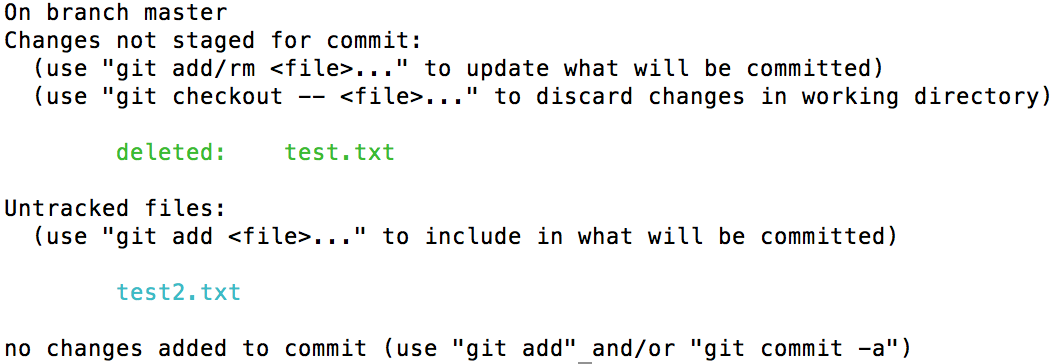
    So what have we here? We start off by creating a new directory called test. We then go into the directory and start a new local git repository using git init. Next we create a new file called test.txt that contains simple text “hi”. test.txt is then added and committed to the repository. Finally, we use the mv command to rename the file to test2.txt.

    git status shows us the result:

    Git status after 'mv'
    Result of git status

    This is not what we were expecting. This shows that the original file test.txt was deleted and now there is an untracked new file called test2.txt, when it really should say that test.txt was renamed to test2.txt.

    Btw, this goes for moving files as well. For example, rather than renaming the file, if it was moved to, say, a different folder, e.g. newFolder/test.txt, the result would be the same.

    So how can this be solved? It’s actually not far off from the steps above. Let’s start with backtracking by reverting the rename:

    $ git checkout test.txt
    $ rm test2.txt
    $ git mv test.txt test2.txt
    $ git status

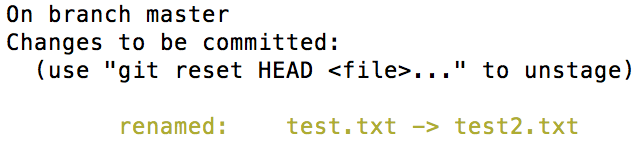
    Running the above commands produces the following result:

    Use 'git mv'
    Use ‘git mv’ to rename/move files

    Much better, isn’t it? Renaming/moving files from git repositories the proper way will allow retention of their history, which is what we want.

  • AWS: EB CLI Throws Exceptions VersionConflict and/or DistributionNotFound

    AWS: EB CLI Throws Exceptions VersionConflict and/or DistributionNotFound

    When running EB CLI, do you run into the following error?

    $ eb deploy
    Traceback (most recent call last):
      File "C:Python34libsite-packagespkg_resources__init__.py", line 635, in _build_master
        ws.require(__requires__)
      File "C:Python34libsite-packagespkg_resources__init__.py", line 942, in require
        needed = self.resolve(parse_requirements(requirements))
      File "C:Python34libsite-packagespkg_resources__init__.py", line 834, in resolve
        raise VersionConflict(dist, req).with_context(dependent_req)
    pkg_resources.ContextualVersionConflict: (colorama 0.3.3 (c:python34libsite-packages), Requirement.parse('colorama==0.3.7'), {'awsebcli'})
    
    During handling of the above exception, another exception occurred:
    
    Traceback (most recent call last):
      File "C:Python34Scriptseb-script.py", line 5, in <module>
        from pkg_resources import load_entry_point
      File "C:Python34libsite-packagespkg_resources__init__.py", line 2900, in <module>
        @_call_aside
      File "C:Python34libsite-packagespkg_resources__init__.py", line 2886, in _call_aside
        f(*args, **kwargs)
      File "C:Python34libsite-packagespkg_resources__init__.py", line 2913, in _initialize_master_working_set
        working_set = WorkingSet._build_master()
      File "C:Python34libsite-packagespkg_resources__init__.py", line 637, in _build_master
        return cls._build_from_requirements(__requires__)
      File "C:Python34libsite-packagespkg_resources__init__.py", line 650, in _build_from_requirements
        dists = ws.resolve(reqs, Environment())
      File "C:Python34libsite-packagespkg_resources__init__.py", line 829, in resolve
        raise DistributionNotFound(req, requirers)
    pkg_resources.DistributionNotFound: The 'colorama==0.3.7' distribution was not found and is required by awsebcli

    I ran into this error today. Apparently it was caused by installing AWS CLI after EB CLI:
    pip install awscli
    Reinstalling EB CLI solved the issue:
    pip install awsebcli

  • React: react-router and dynamic page title

    I have been learning React for the past few weeks, and I am loving it. I spent today learning react-router at https://github.com/reactjs/react-router-tutorial. After going through it and implementing a lot of it in my app, I realized that it did not cover one thing that I really need: dynamic page title.

    I have googled and looked at different examples of how others have done it (e.g. react-document-title, document.title) but I finally decided to tinker on my own and see if I can come up with my own implementation. (I know… another one???)

    My sample code will be added to the result of lesson 3 from the tutorial I linked above:

    App.js:

    import React from 'react'
    import { Link } from 'react-router'
    
    export default React.createClass({
      render() {
        return <div>
          <h1>
            React Router Tutorial
          </h1>
          <ul role="nav">
            <li>
              <Link to="/about">About</Link>
            </li>
            <li>
              <Link to="/repos">Repos</Link>
            </li>
          </ul>
        </div>
      }
    })
    

    index.js:

    import React from 'react'
    import { render } from 'react-dom'
    import { Router, Route, hashHistory } from 'react-router'
    import App from './modules/App'
    import About from './modules/About'
    import Repos from './modules/Repos'
    
    render((
      <Router history={hashHistory}>
        <Route path="/" component={App}/>
        <Route path="/repos" component={Repos}/>
        <Route path="/about" component={About}/>
      </Router>
    ), document.getElementById('app'))
    

    Looking at index.js, I thought why not add a title attribute on the Route nodes directly? That would be the most convenient location, in my mind.

    index.js:

    import React from 'react'
    import { render } from 'react-dom'
    import { Router, Route, hashHistory } from 'react-router'
    import App from './modules/App'
    import About from './modules/About'
    import Repos from './modules/Repos'
    
    render((
      <Router history={hashHistory}>
        <Route path="/" component={App}/>
        <Route path="/repos" title="Repositories" component={Repos}/>
        <Route path="/about" title="About Me" component={About}/>
      </Router>
    ), document.getElementById('app'))
    

    We added it to routing, but how will App get its value? This part is easy.

    App.jsx:

    import React from 'react'
    import { Link } from 'react-router'
    
    export default React.createClass({
      render() {
        return <div>
          <h1>
            {this.props.children.props.route.title}
          </h1>
          <ul role="nav">
            <li>
              <Link to="/about">About</Link>
            </li>
            <li>
              <Link to="/repos">Repos</Link>
            </li>
          </ul>
        </div>
      }
    })
    

    That’s it.

  • camelCase? underscore? dashes??

    I think it’s always confusing to know which to use, but I won’t get into that here. Instead, I will list the differences for future reference:

    • camelCase
    • PascalCase
    • snake_case
    • train-case
    • StUdLyCaPs
    • UPPERCASE
    • lowercase

    Juggling multiple programming languages on a daily basis, this still gives me a headache.