What technology would you be better off without, why?
If you asked me to list the technology that drains my happiness the most, my mind jumps to the usual suspects.
I could blame social media and the infinite scroll that destroys my ability to focus. I could blame the loss of privacy from smart home devices listening in on my living room conversations. I could even blame workplace chat apps like Slack that keep me on high-alert.
But those are just symptoms. If we really want to cure the digital fatigue we are all feeling, we have to look at the root cause. We have to look at the delivery mechanism.
If I could un-invent one piece of technology, it would be the Smartphone.
I get frustrated when I browse a file from a git repository only to realize its history was lost due to improper renaming/moving of the file. It seems common for developers to manually rename/move a file in a git repository by using regular file system commands rather than git commands.
For example, let’s look at the following:
$ mkdir test
$ cd test
$ git init
$ echo "hi" > test.txt
$ git add test.txt
$ git commit -m"add test.txt"
$ mv test.txt test2.txt
$ git status
So what have we here? We start off by creating a new directory called test. We then go into the directory and start a new local git repository using git init. Next we create a new file called test.txt that contains simple text “hi”. test.txt is then added and committed to the repository. Finally, we use the mv command to rename the file to test2.txt.
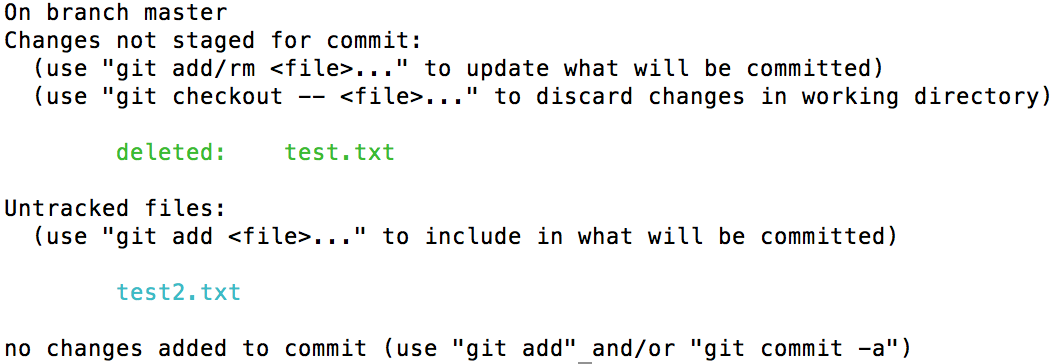
git status shows us the result:
Result of git status
This is not what we were expecting. This shows that the original file test.txt was deleted and now there is an untracked new file called test2.txt, when it really should say that test.txt was renamed to test2.txt.
Btw, this goes for moving files as well. For example, rather than renaming the file, if it was moved to, say, a different folder, e.g. newFolder/test.txt, the result would be the same.
So how can this be solved? It’s actually not far off from the steps above. Let’s start with backtracking by reverting the rename:
I was routinely upgrading my packages on Homebrew when I ran into the following error:
$ brew upgrade
==> Upgrading 1 outdated package, with result:
homebrew/php/php70 7.0.4
==> Upgrading homebrew/php/php70
==> Downloading https://php.net/get/php-7.0.4.tar.bz2/from/this/mirror
Already downloaded: /Library/Caches/Homebrew/php70-7.0.4
==> ./configure --prefix=/usr/local/Cellar/php70/7.0.4 --localstatedir=/usr/local/var --sysconfdir=/usr/local/etc/php/7.0 --with-config-file-path=/usr/local/etc/php/7.0 --wi
Last 15 lines from /Users/johnro/Library/Logs/Homebrew/php70/01.configure:
checking for OpenSSL support... yes
checking for Kerberos support... /usr
checking whether to use system default cipher list instead of hardcoded value... no
checking for krb5-config... /usr/bin/krb5-config
checking for RAND_egd... no
checking for pkg-config... no
checking for OpenSSL version... >= 0.9.8
checking for CRYPTO_free in -lcrypto... yes
checking for SSL_CTX_set_ssl_version in -lssl... yes
checking for PCRE library to use... bundled
checking whether to enable the SQLite3 extension... yes
checking bundled sqlite3 library... yes
checking for ZLIB support... yes
checking if the location of ZLIB install directory is defined... no
configure: error: Cannot find libz
Of course, I did the first thing I always do when running into an error, Google it! And I found this link that suggested running the following:
I have used PHP to connect to SQL Server plenty of time, and every time I would use the SQLSRV extension. The problem with that is, PHP’s SQLSRV extension is only available for Windows servers. Which wasn’t a problem for me because I would normally develop PHP on Windows machines. It wasn’t until recently I needed SQL Server access on a Linux machine.
It wasn’t as straightforward as I had hoped, and it certainly did not help to learn that the MSSQL PHP extension was removed in version 7.0, which took me a few hours to discover. I am writing this post in hopes that I save some people a few hours of pain, including my future self. (more…)
I had a panic attack today. I had left my MacBook Air inside its sleeves and on my bookshelf for a week since I didn’t have an immediate need for it and I didn’t want someone stealing it. I took it out today to prepare it for a trip overseas, only to find that my MacBook Air wasn’t charging and the charger LED wasn’t turning on. I opted not to buy the extended AppleCare, and mine expired a few months ago. I looked up the cost for a new charger to find out it’ll cost me $79. $79!!! I knew of Apple and their premium prices, but I still found it shocking.





 johnro