About ten years into my career, I had the opportunity to work on a large-scale, business-critical talent management software system. One part of the platform I focused on was the application workflow — the feature where candidates applied for jobs.
This workflow might sound straightforward, but it was mission-critical. If it broke, candidates couldn’t apply, customers missed out on talent, and everyone lost valuable time. The challenge was that candidates themselves rarely reported errors; instead, our clients would eventually notice and file a bug report. By then, the damage had already been done.
About ten years into my career, I had one of those rare light bulb moments that completely reshaped how I approached engineering. Until then, I’d mostly thought of my role in terms of building features, fixing bugs, and keeping things moving. But thanks to a push from a colleague in product, I began to see things differently — not just as an engineer, but as someone responsible for the experience of real people using what we built.
It’s been a while since I last posted here. Life, work, and all the usual busyness pulled me away, but I’ve missed writing. So here I am, back again. My plan is to post more regularly, and I thought I’d start with something that’s been on my mind for a while: what it’s like to go from being a player of games to someone who helps build them.
My WordPress site is now on AWS! I spent a good chunk of my time debugging the All-in-One WP Migration plugin to get my migration working, and I finally realized I skipped an important step in their migration documentation:
Happy new year! I have been lazy with my posts the past months (years?) so as part of my new resolutions I plan to write more.
While I am here, I will leave a tip on how to better yourself as a software developer/enthusiast: practice, learn, practice. Continue to learn, and repetition is key to nailing information in your brain! Also, check out https://www.pluralsight.com or https://www.lynda.com for study material.
While working on ETL (Extract, Transform, Load) projects at work, I ran into an unusual issue using xlsjs:
Error: Unrecognized ExtProp type: 2 0
After digging through the `xlsjs` source code, I realized that it was following the MS-XLS Specifications, as it should, and section 2.5.108 ExtProp, the extType value that I was running into was not defined in the table. Seeing as the format structure was related to formatting, I forked the `xlsjs` library and created a version that was more forgiving.
If you are running into this issue and want a workaround, try xlsjs2.
I get frustrated when I browse a file from a git repository only to realize its history was lost due to improper renaming/moving of the file. It seems common for developers to manually rename/move a file in a git repository by using regular file system commands rather than git commands.
For example, let’s look at the following:
$ mkdir test
$ cd test
$ git init
$ echo "hi" > test.txt
$ git add test.txt
$ git commit -m"add test.txt"
$ mv test.txt test2.txt
$ git status
So what have we here? We start off by creating a new directory called test. We then go into the directory and start a new local git repository using git init. Next we create a new file called test.txt that contains simple text “hi”. test.txt is then added and committed to the repository. Finally, we use the mv command to rename the file to test2.txt.
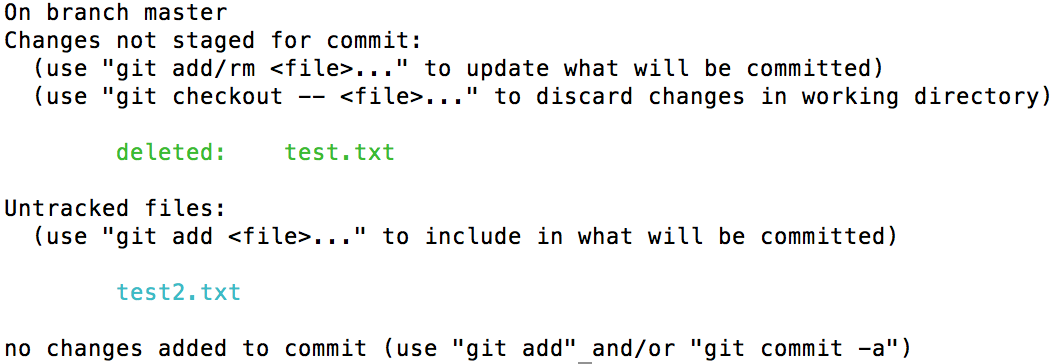
git status shows us the result:
Result of git status
This is not what we were expecting. This shows that the original file test.txt was deleted and now there is an untracked new file called test2.txt, when it really should say that test.txt was renamed to test2.txt.
Btw, this goes for moving files as well. For example, rather than renaming the file, if it was moved to, say, a different folder, e.g. newFolder/test.txt, the result would be the same.
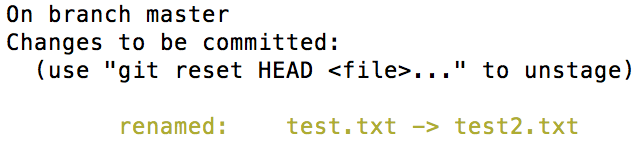
So how can this be solved? It’s actually not far off from the steps above. Let’s start with backtracking by reverting the rename:
When running EB CLI, do you run into the following error?
$ eb deploy
Traceback (most recent call last):
  File "C:Python34libsite-packagespkg_resources__init__.py", line 635, in _build_master
    ws.require(__requires__)
  File "C:Python34libsite-packagespkg_resources__init__.py", line 942, in require
    needed = self.resolve(parse_requirements(requirements))
  File "C:Python34libsite-packagespkg_resources__init__.py", line 834, in resolve
    raise VersionConflict(dist, req).with_context(dependent_req)
pkg_resources.ContextualVersionConflict: (colorama 0.3.3 (c:python34libsite-packages), Requirement.parse('colorama==0.3.7'), {'awsebcli'})

During handling of the above exception, another exception occurred:

Traceback (most recent call last):
  File "C:Python34Scriptseb-script.py", line 5, in <module>
    from pkg_resources import load_entry_point
  File "C:Python34libsite-packagespkg_resources__init__.py", line 2900, in <module>
    @_call_aside
  File "C:Python34libsite-packagespkg_resources__init__.py", line 2886, in _call_aside
    f(*args, **kwargs)
  File "C:Python34libsite-packagespkg_resources__init__.py", line 2913, in _initialize_master_working_set
    working_set = WorkingSet._build_master()
  File "C:Python34libsite-packagespkg_resources__init__.py", line 637, in _build_master
    return cls._build_from_requirements(__requires__)
  File "C:Python34libsite-packagespkg_resources__init__.py", line 650, in _build_from_requirements
    dists = ws.resolve(reqs, Environment())
  File "C:Python34libsite-packagespkg_resources__init__.py", line 829, in resolve
    raise DistributionNotFound(req, requirers)
pkg_resources.DistributionNotFound: The 'colorama==0.3.7' distribution was not found and is required by awsebcli
I ran into this error today. Apparently it was caused by installing AWS CLI after EB CLI: pip install awscli
Reinstalling EB CLI solved the issue: pip install awsebcli
I have been learning React for the past few weeks, and I am loving it. I spent today learning react-router at https://github.com/reactjs/react-router-tutorial. After going through it and implementing a lot of it in my app, I realized that it did not cover one thing that I really need: dynamic page title.
I have googled and looked at different examples of how others have done it (e.g. react-document-title, document.title) but I finally decided to tinker on my own and see if I can come up with my own implementation. (I know… another one???)
My sample code will be added to the result of lesson 3 from the tutorial I linked above:






 johnro